Unmasking KorPlug: A Technical Breakdown - Part 1
Executive Summary
In late May 2025, RevEng.AI identified a new sample of KorPlug (a.k.a Hodur) —a well-known Remote Access Trojan (RAT) frequently leveraged in targeted cyber-espionage campaigns—uploaded to a third-party file-scanning platform. This report is the first in a three-part series detailing a malware campaign involving KorPlug.
This is the first of three reports describing a KorPlug campaign, detailing a three-stage malware-execution chain.
The observed campaign detailed in this Part 1 of reporting employs a multi-stage execution chain designed to evade detection:

- Initial Access begins with a seemingly benign Microsoft Installer (MSI) file.
- Execution involves DLL sideloading alongside deobfuscation of a payload file on disk– by abusing a legitimate, signed Canon Inc. executable.
- Execution of a malicious payload, culminates in a memory-only deployment of KorPlug, using non-standard Windows callback APIs to execute the final stage
RevEng.AI assesses with high confidence that this activity is attributable to an China-nexus threat actor based on:
- Code Similarity Analysis: Large-scale static analysis performed by RevEngAI’s proprietary engine revealed significant code-level overlaps with previously documented KorPlug variants.
- Infrastructure and Tooling Overlap: Strong alignment with KorPlug infrastructure and techniques observed in previous China-attributed operations [7].
- Use of Trusted Signed Binaries: The abuse of a Canon Inc. signed executable for DLL hijacking mirrors tradecraft seen in earlier campaigns attributed to Chinese threat actors, specifically MUSTANG PANDA (a.k.a. Proofpoint: TA416, PwC: Red Delta, or PAN: PKPLUG).
Analysis Highlights
Stage 1 - MSI File
The initial stage of the execution chain is a Microsoft System Installer (MSI) file with an unspecific name (SHA-256: 2e888ffd9d7ab1a210b4165f4f2aa34b1e42e7c4eed79dd9c9f310659c59f10d). An MSI file is a structured database used by Windows Installer to manage the installation, maintenance and removal of software. This file was first seen on a third-party scanning service on 16 April 2025 [8].
| Name | Description | Size | Component |
|---|---|---|---|
cnmplog.dat |
Obfuscated payload file containing KorPlug | 636928 | qyqucbR |
cnmpaui.exe |
Legitimate, signed Canon Inc. executable | 360112 | ffbbcXyYbd |
cnmpaui.dll |
Hijacked DLL loaded by legitimate executable | 103088 | aVQmeTixZGa |
Figure 2: Files contained within the MSI file
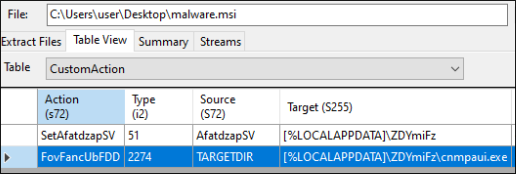
Analysis of the MSI within the CustomAction and InstallExecuteSequence tables reveals further insight into the initial installation logic of KorPlug. In the sample examined by RevEng.AI, a custom action named FovFancUbFDD is defined that is configured to launch an executable file cnmpaui.exe (SHA-256: 2e888ffd9d7ab1a210b4165f4f2aa34b1e42e7c4eed79dd9c9f310659c59f10d) within %LOCALAPPDATA%. The command-line: %LOCALAPPDATA%\ZDYmiFz\cnmpaui.exe is configured to be used.
Stage 2 - Execution of Malicious Hijacked DLL
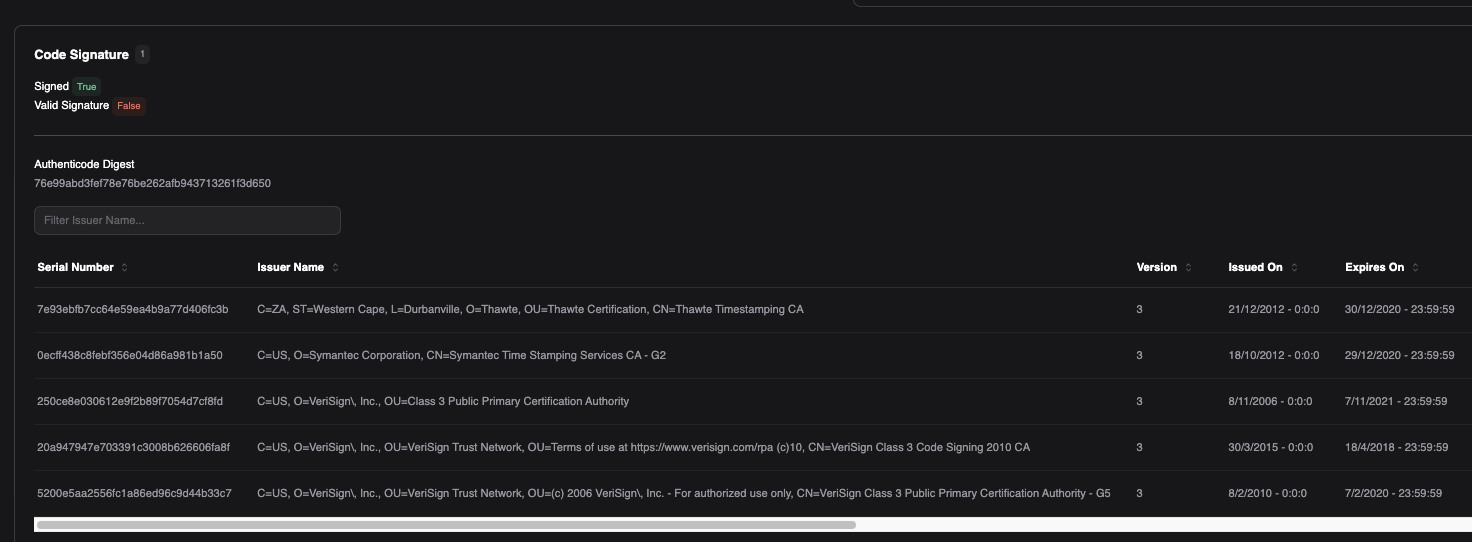
The legitimate, signed executable (cnmpaui.exe) executed under the MSI installer, signed by Canon Inc (serial: 20 A9 47 94 7E 70 33 91 C3 00 8B 62 66 06 FA 8F) is a printer utility used for Canon devices. Although the signature has expired (30/12/2020 - 23:59:59), Windows does not mark the signature as invalid – a design choice by Microsoft.
The flawed implementation of blindly loading another application-related DLL, cnmpaui.dll (SHA-256: c1124deb209ed291a98c7185bee26946beec7161d4f22519902f80393ffca660) – which allows for DLL hijacking – is relatively straightforward.
Towards the end of the entrypoint within the executable, it exhibits a common pattern involving the dynamic loading of the DLL file, the resolution of exported function MaintenanceAppStart using GetProcAddress, and the subsequent execution of the retrieved function pointer with three parameters.

The use of DLL hijacking in this context allows the malicious DLL bundled within the KorPlug execution pipeline to be executed under the context of a signed process. This is a common technique frequently used by threat-actors to abuse legitimate executables as means of evading detection on a host.
Stage 3 - KorPlug DLL Loader
The malicious hijacked DLL named cnmpaui.dll, SHA-256: c1124deb209ed291a98c7185bee26946beec7161d4f22519902f80393ffca660, is signed with a bogus, invalid signature masquerading as the legitimate executable’s signer–Canon Inc. This can be observed below in Figure 4.
The DLL file only contains two exports: DllMain and MaintenanceAppStart. MaintenanceAppStart contains the malicious functionality of the DLL loader in this instance, which – as previously discussed – is executed by the loading executable.
The first function called within the MaintenanceAppStart function is located at 0x10001000, referred in the pseudocode here as get_function_pointers [1].
Upon initialisation, the function searches for Windows API functions by precomputed hashes and stores their resolved addresses in the Thread Environment Block (TEB) – using Thread Local Storage (TLS). This is a common evasion tactic designed to avoid direct API references appearing in the Import Address Table (IAT).
To aid in this resolution, it calls a helper function located at 0x10001F90, referred within Figure 5 as get_function_by_hash [2]. The functions that are resolved are primarily memory management system-call APIs.

Further analysis of the MaintenanceAppStart function reveals a typical setup for Windows event-driven applications, although without a message loop. Examining the function flow, we can identify that the Windows Procedure function.
By calling a ShowWindow function in MaintenanceAppStart, a message with the ID 0x18 is sent to the message queue to be interpreted by WinProc. This function will forward all messages that do not have the ID 0x18 to NtdllDefWindowProc_W.
However, if the message ID matches the expected one (0x18), it triggers the creation of a new thread via CreateThread [3], passing the function located at 0x10001C60 as the target function:
- The function first proceeds by calling itself recursively. During this process, it invokes GetModuleFileNameW [4] to retrieve the path of the current executable, extracts the directory, and appends the string _\cmplog.dat, a file also present in the MSI package and which appears to be obfuscated.
- Next, it checks for the existence of this file using the CreateFileW [5] API. If the file is found successfully, the execution continues by calling the final key function in this sample, located at 0x10001490, renamed to load_and_execute [6]. This function is responsible for allocating memory and reading the contents of the file, as well as allocating additional memory to hold the decrypted version of the next stage in the execution chain.
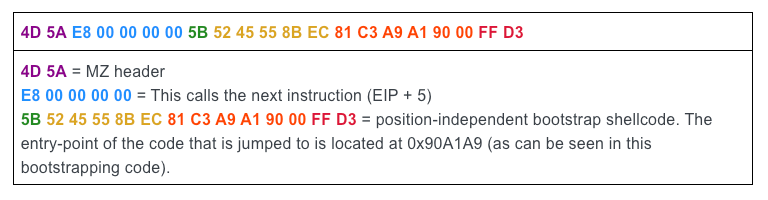
- Finally, to load KorPlug, this sub-stage makes use of the EnumSystemGeoID API. At first glance, one might assume that the next stage is a shellcode rather than a PE file, but that assumption would be incorrect. In reality, the first bytes of the PE file are shellcode, effectively invoking the first function of the next stage.
An extract of the first 22-bytes in the shellcode used for the execution of the DLL can be observed below, which has been highlighted with a colour-key:
This loading phase ultimately leads to the execution of KorPlug. This will be analysed in the next part of this series.
Assessment
RevEng.AI assesses this activity to a currently unnamed China-nexus threat actor based on comprehensive analysis of observed Tactics, Techniques, and Procedures (TTPs) that demonstrate strong alignment with established patterns documented in open-source intelligence reporting – specifically the code overlap with known KorPlug builds, use of DLL hijacking, and tooling overlap. This attribution assessment reflects behavioural consistencies and modus operandi of China-nexus actors.
RevEng.AI does not currently have enough evidence to corroborate these findings to known activity from a named China-nexus actor.
Conclusion
The first stage of this KorPlug execution chain showcases a structured and multi-layered approach designed to evade detection and ensure successful payload delivery. From the use of a seemingly benign MSI installer to the strategic abuse of DLL side-loading and dynamic API resolution, each step in the chain demonstrates a clear intent to blend into legitimate system activity. The reliance on obfuscated payloads, memory-only execution, and signature misuse further reinforces the sophistication behind the operation.
How RevEng.AI Can Help
RevEng.AI's advanced analysis capabilities provide unparalleled insights into complex malware. Our ability to deconstruct intricate infection chains, identify hidden tactics, and attribute activity to specific threat actors empowers security teams to:
- Gain deeper threat intelligence: Understand the "how" and "why" behind sophisticated attacks.
- Strengthen defensive postures: Proactively adjust security controls based on real-world threat actor methodologies.
- Improve incident response: Quickly and accurately identify compromised systems and eradicate threats.
For more information you can request a Demo of the RevEng.AI platform.
MITRE ATT&CK® Mapping
| Tactic | Technique | ID | Observed behavior |
|---|---|---|---|
| Initial access | User execution: malicious file | T1204.002 | Infection begins with execution of a malicious MSI file by the user. |
| Execution | Shared modules | T1129 | DLL sideloading using a signed executable to load a malicious cnmpaui.dll. |
| Defense evasion | Signed binary proxy execution | T1218 | Legitimate signed executable from Canon Inc. used to execute malicious DLL. |
| Defense evasion | Obfuscated files or information | T1027 | API functions resolved using precomputed hashes. |
| Defense evasion | Dynamic API resolution | T1027.004 | Functions like LoadLibrary, GetProcAddress used via hashing and resolved dynamically into TLS. |
| Defense evasion | DLL side-loading | T1574.002 | Malicious DLL is loaded by a trusted, signed executable. |
| Discovery | System information discovery | T1082 | GetModuleFileNameW used to retrieve the current executable path. |
| Discovery | File and directory discovery | T1083 | Malware checks for the presence of cmplog.dat file. |
| Defense evasion | Hide artifacts: hidden files and directories | T1564.001 | Use of encrypted file (cmplog.dat) and memory-only execution to avoid detection. |
| Defense evasion | Deobfuscate/decode files or information | T1140 | Decryption of next stage payload from cmplog.dat. |
| Execution | Native API | T1106 | Use of Windows API (e.g., EnumSystemGeoID) to execute the decrypted binary. |
| Defense evasion | Signed binary proxy execution: Msiexec | T1218.007 | MSI used as initial payload wrapper to appear benign. |
Indicators Of Compromise (IOCs)
| IOC | Description |
|---|---|
2e888ffd9d7ab1a210b4165f4f2aa34b1e42e7c4eed79dd9c9f310659c59f10d | Content of the MSI file (1st stage), represented by its SHA-256 hash. |
4ed76fa68ef9e1a7705a849d47b3d9dcdf969e332bd5bcb68138579c288a16d3 | Content of the PE file (EXE - 2nd stage), represented by its SHA-256 hash. |
c1124deb209ed291a98c7185bee26946beec7161d4f22519902f80393ffca660 | Content of the PE file (DLL - 3rd stage), represented by its SHA-256 hash. |
63a8d8cd79ebf2a2c8003164e8615eba61f3a4c60a64d04a18c455abacea8be7 | Content of the cmplog.dat file, represented by its SHA-256 hash. |
%LOCALAPPDATA%\ZDYmiFz\cnmpaui.exe | Command-line configured for use by the MSI. |
Footnotes
[1] korplug_get_function_pointers function in KorPlug
[2] korplug_get_function_by_hash function in KorPlug
[3] CreateThread function (processthreadsapi.h) -
[4] GetModuleFileNameA function (libloaderapi.h) - https://learn.microsoft.com/en-us/windows/win32/api/libloaderapi/nf-libloaderapi-getmodulefilenamea
[5] CreateFileW function (fileapi.h) - https://learn.microsoft.com/en-us/windows/win32/api/fileapi/nf-fileapi-createfilew
[6] korplug_load_and_execute function in KorPlug
[7] https://www.welivesecurity.com/2022/03/23/mustang-panda-hodur-old-tricks-new-korplug-variant/